Saturday, 8 September 2018

Tuesday, 7 August 2018
Twitter CEO Jack Dorsey defends failure to ban Alex Jones
Jack Dorsey refuses to follow Apple, Facebook and YouTube in banning Jones, saying he will be guided by principles rather than pressure

Twitter founder Jack Dorsey has defended his company’s decision to continue publishing the controversial tweets of the American conspiracy theorist Alex Jones, saying Jones’s content “hasn’t violated our rules”.
Facebook, Apple, YouTube and Spotify have all banned Jones’ from their platforms, saying he promoted hate speech and violence, but Twitter had allowed Jones to continue posting on the platform. Dorsey said the company was committed to promoting “a healthy conversational environment” – which included Jones. “We’re going to hold Jones to the same standard we hold to every account, not taking one-off actions to make us feel good in the short term, and adding fuel to new conspiracy theories,” he said.
“If we succumb and simply react to outside pressure, rather than straightforward principles we enforce (and evolve) impartially regardless of political viewpoints, we become a service that’s constructed by our personal views that can swing in any direction. That’s not us.”
Jones, who is being sued by the parents of children murdered in the 2012 Sandy Hook shooting for claiming the attack was a hoax, is the host of the daily Alex Jones Show podcast, and his platform Infowars produces another five podcasts.
Dorsey said it was the responsibility of journalists to police accounts such as Jones’ for accuracy and fairness.
“Accounts like Jones’ can often sensationalize issues and spread unsubstantiated rumors, so it’s critical journalists document, validate, and refute such information directly so people can form their own opinions,” said Dorsey. “This is what serves the public conversation best.”
Facebook’s and YouTube’s enforcement action against Jones came hours after Apple removed Jones from its podcast directory on 6 August.
Publishing platforms have faced strong pressure to take action against Jones and Infowars over the past few months, but Apple was the first major company to sanction the broadcaster in its entirety.
Dorsey directed readers towards an article further explaining Twitter’s rules. “Twitter is reflective of real conversations happening in the world and that sometimes includes perspectives that may be offensive, controversial, and/or bigoted,” the document read. “While we welcome everyone to express themselves on our service, we prohibit targeted behaviour that harasses, threatens, or uses fear to silence the voices of others.”
Twitter remains the lone major social network to still allow Jones unfettered access and the broadcaster has a “verified” account. An increasing number of Twitter users have started campaigning for the site to bar Jones and accusing Dorsey of seeking to shift responsibility to journalists.
Since founding Infowars in 1999, Jones has built a vast audience. Among the theories he has promoted is that the 9/11 attacks on New York and Washington were staged by the government. He has also promoted an untrue theory that the Sandy Hook massacre was faked by left-wing forces to promote gun control. The shooting killed 26 children and adults at the elementary school in Connecticut.
The age of hard drives is over as Samsung cranks out consumer QLC SSDs
Samsung has started mass production of the world's first QLC (quad-level cell) consumer SSD.
QLC is 4 bits/cell flash technology and a next step in cell bit capacity from the current TLC (3 bits/cell). Foundries belonging to Intel/Micron, SK Hynix and WD/Toshiba have started producing QLC chips and, in some cases, SSDs already. For example, Micron has a 7.68TB QLC SSDcalled the 5210 ION. SK Hynix has not yet confirmed any QLC technology developments.
Samsung announced a QLC SSD development earlier this month. It has followed that up by saying it is now mass-producing a 4TB QLC consumer SSD.
The device uses 32 x 1Tbit (128GB) 64-layer V-NAND die and does 540MB/sec sequential reads and 520MB/sec sequential writes. Micron's 5210 ION does up to 549MB/sec sequential reads but only up to 340MB/sec sequential writes. Samsung has balanced its sequential read/write performance in comparison.
However, Sammy has not revealed random read and write IOPS numbers, which could mean they are nothing to boast about or that the controller is still being tuned.
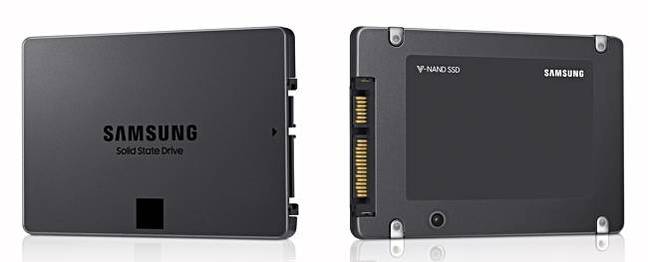
Sammy-supplied 4TB QLC consumer SSD case shots - with no product information labelling
There is a three-year warranty but no lifetime terabytes written rating as yet.
Samsung Electronic's Jaesoo Han, exec veep for memory sales and marketing, proclaimed: "Samsung's new 4-bit SATA SSD will herald a massive move to terabyte-SSDs for consumers. As we expand our lineup across consumer segments and to the enterprise, 4-bit terabyte-SSD products will rapidly spread throughout the entire market."
That may well be the case, but this "product" has no name, no price, no availability, and no detailed IOPS and endurance information, making the announcement possibly a tad premature.
With this QLC tech, Samsung said it will "introduce several 4-bit consumer SSDs later this year with 1TB, 2TB, and 4TB capacities" in the 2.5-inch form factor. We look forward to getting more details then.
Sammy sees itself producing a 128GB memory card for smartphones and M.2 NVMe SSDs for the enterprise later this year and should begin mass production of QLC fifth-generation (96-layer) V-NAND.
That should produce a die with more than 1Tbit capacity, implying 2019 should bring even higher capacity SSDs. The future is not bright for desktop and notebook disk drives. ®
Little Interest From Software Developers in Microsoft's New Apps Plan

Microsoft's plan to make its new version of Windows a mobile hit by letting it accept tweaked Apple and Android apps has met an obstacle: some of the software developers the company needs to woo just aren't interested.
Windows phones accounted for just 3 percent of global smartphone sales last year, compared with about 81 percent for devices with Google's Android system and 15 percent for Apple and its iOS system, according to research firm IDC. One reason is that Windows doesn't run as many or as attractive apps as its rivals.
To boost sales of its phones and new operating system, Microsoft said last month that it would provide tools to software developers to make it easier to design apps for Windows based on apps that run on Android or Apple. But because so few people use a Windows phone, most developers remain focused on the more popular systems and don't see a need to develop apps for Windows. They also said they doubt how easy the new tools will be to use.
"Windows phone will have to gain a significant share of the market before this becomes something that saves us time and/or money," said Sean Orelli, a director at app development firm Fuzz Productions in New York, which makes apps related to Citibank, the New York Post, and Conde Nast, among others.
For Microsoft, the world's biggest software company, there's a lot at stake this summer as it rolls out Windows 10, the first operating system designed to run on PCs, tablets and phones. If developers don't embrace the new platform, it will seriously damage the prospects of the new operating system, which Microsoft hopes will power one billion devices in two or three years.
Candy Crush
Interviews with more than a dozen developers found just one planning to move an app from Apple or Android to Microsoft (MSFT.O). That's King.com, which ported its popular Candy Crush Saga game from iOS to Windows 10 "with very few code modifications" and will be installed automatically with upgrades to Windows 10, according to Microsoft. King.com confirmed the move but declined to comment further.
Eight developers said they aren't planning to develop for Windows 10 at all. Four who already have Windows apps said they would continue to do so.
Because Microsoft hasn't actually unveiled its new set of tools to turn apps into a Windows format, developers did not rule out any move, and a Microsoft spokesman said that "it is still early" and many software companies want to explore the tools over the coming months.
More and better apps might attract more people to buy a Windows phone or tablet, Microsoft reasons. Only six of the top 10 free apps on iPhone are available for Windows phone, and of those, two are made by Microsoft itself. In the past Microsoft has paid developers to create Windows apps.
More and better apps might attract more people to buy a Windows phone or tablet, Microsoft reasons. Only six of the top 10 free apps on iPhone are available for Windows phone, and of those, two are made by Microsoft itself. In the past Microsoft has paid developers to create Windows apps.
Failure to attract the apps would not be fatal for Microsoft, which is growing more reliant on its Office, server software and cloud computing services, but it would be a sign that Microsoft is losing its hold on personal computing, in a world where phones are expected to outsell PCs by more than six to one by 2017.
Because of that trend, "it's going to be hard for developers to prioritize building for Microsoft," said John Milinovich, Chief Executive of URX, a mobile ad service that creates links between apps.
Satic Business
Windows, closely tied to the stagnant PC market, is a big but static business for Microsoft. It's likely worth $20 billion in revenue this fiscal year, analysts say, compared with almost $30 billion for its Office business, out of total expected annual revenue of $93 billion. The company's server software and cloud-computing businesses are growing much faster, with cloud-computing revenue forecast to triple to $20 billion by 2018.
Even though only a handful of developers have been allowed a sneak preview of the new tools Microsoft says it's preparing, most doubt it will be easy to take iOS and Android apps to Windows. Concerns include how the Windows app will use batches of pre-written software, called libraries, that an app needs to run, and the prospects that Apple's new language, called Swift, may soon eclipse the current oneErik Rucker, head of mobile at Smartsheet, which makes an online tool to manage projects, said he doesn't plan a Windows app version. He doubts tweaking an iPad or iPhone app for Windows would be simple.
"We'd end up writing a whole bunch more code," to move over an Apple app that was tightly integrated with the device, he said.
For Jason Thane, general manager at General UI, a mobile app developer based in Seattle, the cost of developing a Windows app from another system would need to fall to about 10 percent to 20 percent of the cost of building it.
"It can cost 50 percent or more of the cost to develop an app on one platform to port it to a new platform," said Thane, who hasn't yet used the new tools. "So if Microsoft has a way for our customers to do it easily and cheaply, and if there's no serious performance or functionality impact, I think they'd have a lot of people wanting to do it."
Even a little extra effort is too much for some smaller developers, including former Microsoft executive Adam Tratt, who now runs Haiku Deck, which makes presentation software primarily designed for iPads.
"I'd like to at some point, but we're not working on it yet," he said. "It's a function of resources."
Recent history hasn't been on Microsoft's side. Last year Pinterest pulled its Windows Phone test app, and this year Chase and Bank of America stopped supporting Windows phone apps, saying few customers were affected. None of those companies would comment on plans for Windows 10
USA Today, owned by media giant Gannett Co, is building a "universal" app for Windows, which will run across PCs, tablets and phones. But instead of reusing code from its existing Windows apps, or porting from Apple or Android, the development team opted to start fresh.
The best experience was always going to be achieved with tools made for a given software system, said Christopher Kamsler, manager of mobile development at Gannett, and even with those his team had to tweak the app to work for different sized devices.
It's an uphill battle for Microsoft, said Frank Gillett, an analyst at tech research firm Forrester.
"Android and iOS are in the zone, the Windows guys just aren't there yet," he said.
This New Google Chrome Extension Lets Colleagues Share Web Pages Using Beeping Sounds
Google is experimenting with a new Chrome extension called Tone that enables users to share web pages with friends and colleagues using beeping sounds.
Users who have downloaded the extension can transmit tabs that they’re browsing onscreen to others with a single click, which initiates a sequence of beeps and broadcasts the URL address to every other Tone user within earshot.
Though email and messaging have made it easy to transmit links to those located at great distances, “Tone aims to make sharing digital things with nearby people as easy as talking to them,” Google said in a blog post announcing the product.
Because the application depends on sound and aims to behave like speech, transmissions don’t pass through walls, but they do work across short distances and even over Google Hangouts -- without the need to pair devices ahead of time. “Not every nearby machine will always receive every broadcast,” Google warns, “just like not everyone will always hear every word someone says.”
The search giant notes that Tone was created on a whim one afternoon, and says that even its founding team was surprised by how useful they found the extension. “It is our hope that small teams, students in classrooms, and families with multiple computers will too.”
What is Telegram Passport?
is a new feature by the makers of Telegram that is designed as "a unified authorization method for services that require personal identification".
Some companies may require further proof of identification when users create accounts, want to unlock payment limits, or unlock a locked account. The social media giant Facebook may request government issued IDs from locked out account owners to reinstate the account.
All you could do up until now was to take photos of your IDs or documents, transfer them to your computer, go to the website of the service, upload the documents, and wait for the service to verify them.
While sites and services use encryption for the transfer, it is usually unclear how the documents are stored, whether they are shared, and who can access them.
Telegram Passport promises a better solution to the verification process, albeit with the caveat that it services and sites need to integrate it.

Here is how it works: you upload your important documents once and may share the data with services directly when the need arises Apart from the upload-once-and-forget part, it is a lot securer as the system uses end-to-end encryption. The data is encrypted with a password that only the users of Telegram Passport know so that it is impossible for Telegram or anyone else to access it.
When users share data with services, the data is made available directly to the services. Data is stored in the cloud in encrypted form currently; Telegram revealed that it plans to move it to a decentralized cloud in the future.
The first service that implemented Telegram Passport is ePayments, an electronic payments system. The service supports registration and verification with Telegram Passport.
Telegram users need the latest version of the Telegram to make use of the feature. All uploaded data can be accessed under Settings > Privacy & Security > Telegram Passport (on iOS: Settings > Telegram Passport.
Developers can check out the API documentation which includes SDKs and examples.
Closing Words
Will Telegram Passport revolutionize online registration, verification, and authentication processes? That is still up for debate; much depends on wider adoption of the service and the services that users use.
It seems unlikely that larger companies such as Facebook, Google, or Microsoft will adopt it as they prefer inhouse solutions. Telegram Passport won't become a universal standard for this but it could very well assist Telegram users who make use of it in these processes.
How to remove Bitdefender Agent
Bitdefender Agent is an official program by Bitdefender that gets installed alongside other company products such as Bitdefender Antivirus Free Edition or Total Security usually.
You may notice that Bitdefender Agent is running on the system when you check the Task Manager or any third-party process manager.
The process names are ProductAgentService.exe and bdagent.exe among others but the description reveals that it is Bitdefender Agent. If you notice that Bitdefender Agent runs on a Windows PC you may wonder about the functionality of the process and how it got on the system in first place.
The following guide explains what Bitdefender Agent is, how it landed on the Windows machine, and how to remove it.
How to remove Bitdefender Agent

Bitdefender Agent gets installed alongside other Bitdefender products usually. While it is installed separately from the Bitdefender product, e.g. Bitdefender Antivirus Plus, it is part of the product installation and goes by unseen because of that.
It is difficult to find out what Bitdefender Agent is; a search on the Bitdefender website reveals little information about the product. A support article highlights that bdagent.exe "holds the Bitdefender desktop widget, Wallet master password, the ‘B’ system tray icon and “Bitdefender Awake” popup".
The core issue that users may have with the program is that it is not removed when Bitdefender is uninstalled on a PC.
In other words; Bitdefender Agent remains installed on the machine even if you remove Bitdefender's security product from the system. It is unclear why Bitdefender made the decision to keep the program on the system when users and administrators select to remove company products.
Bitdefender Agent may be the cause for installation issues if a user tries to install Bitdefender products and it is completely unnecessary if users don't plan to install another Bitdefender product on the PC.
Program details:
- Installation folder: C:\Program Files\Bitdefender Agent\
- Scheduled Task: Bitdefender Agent WatchDog set to run on log on.
Uninstallation

You can remove Bitdefender Agent like any other program installed on the Windows PC. If you run Windows 7 or Windows 8, you can remove the program using the Control Panel while Windows 10 users may use the Settings application for that.
You may also use third-party program uninstallers which offer clean-up operations after the regular removal.
Probably the easiest way to remove the program is the following:
- Open the Start Menu.
- Type appwiz.cpl and select the result. This should open the Programs and Features Control Panel applet.
- Locate Bitdefender Agent in the list of installed programs.
- Right-click on it and select uninstall.
- Confirm the UAC prompt and wait until the process completes.
Bitdefender Agent is removed from the system. You may want to check the program folder and the Task Scheduler to make sure the program is removed completely.
Closing Words
Bitdefender's installer will install Bitdefender Agent again should you install a company product again on the target machine. The program is loaded on log in and it runs as a background process even if no other Bitdefender software is installed.
KB4340917 update released for Windows 10 version 1803
Microsoft released KB4340917 for Windows 10 version 1803, the April 2018 Update, which brings the version of the operating system to 17134.191 after installation.
It is the second update that Microsoft released for the latest stable version of Windows 10 version 1803 after last week's release of KB4345421 which addressed several issues introduced by the July 2018 Patch Day.
Up until today, only Windows 10 version 1803 received a second cumulative update after Patch Tuesday this month. It is possible that updates for previous versions of Windows 10 will be provided by Microsoft eventually.
KB4340917

KB4340917 contains the following fixes and improvements according to the release notes:
- Fixed an issue with OpenType fonts that would not print in Win32 applications.
- Fixed a memory leak with DNS Response Rate Limiting in LogOnly mode.
- Addressed Remote App session issue that resulted in black screens when maximizing application windows on a secondary monitor.
- Addressed an IME issue with Japanese input in applications such as Microsoft Outlook.
- Addressed Quality of Service QOS parameters for Bluetooth connections related to peripherals.
- Fixed a SQL Server memory leak that would see memory usage grow over time when encrypting data using a symmetric key that has a certificate.
- Fixed an authentication issue in wireless PEAP environments with SSO that would send two authentication requests instead of just one; this could result in premature accuont lockouts. To enable the changes, admins need to create the Dword value DisableAuthRetry with the value of 1 on HKEY_LOCAL_MACHINE\SYSTEM\CurrentControlSet\Services\RasMan\PPP\EAP\26
- Fixed a roaming user profiles issue that caused the AppData\Local and AppData\Locallow folders to synchronize incorrectly during logon and logoff.
- Addressed a Push to Install service registration issue.
- Universal CRT Ctype family of functions improvements in regards to handling EOF as valid input.
- Fixed additional time zone information issues.
- Addresses an issue that causes devices within Active Directory or Hybrid AADJ++ domains to unexpectedly unenroll from Microsoft Intune or third-party MDM services after installing provisioning package updates (PPKG). This issue occurs on devices that are subject to the Auto MDM Enrollment with AAD Token Group Policy. If you ran the script Disable-AutoEnrollMDMCSE.PS1 as a workaround for this issue, run Enable-AutoEnrollMDMCSE.PS1 from a PowerShell window in Administrator mode after installing this update.
KB4340917 is available through Windows Update on systems with automatic update functionality enabled. You can run a manual check for updates to have it picked up immediately by pressing Windows-I, opening Updates & Security, and
The update is also available for direct download on the Microsoft Update Catalog website.
Add Support for Flac, Ogg and other formats to Windows Media Player
Windows Media Player is a native multimedia player that is available in all versions of Windows that Microsoft supports. While Microsoft did create special editions for use in the European Union and some other regions that come without it by default, it is fair to say that the player is available on the vast majority of Windows systems.
Windows Media Player supports only select media formats by default. It supports audio formats such as mp3, wav, or wmv, and a selection of video formats as well.
The multimedia player refuses to play any format that it does not support; that is different from players such as VLC Media Player or AIMP that play a gazillion formats out of the box.
WMP Tag Plus plugin for Windows Media Player
WMP Tag Plus is an extension for Windows Media Player that adds support for several new formats to the multimedia player.
Support in this context means that Windows Media Player plays the new formats just like any other and that it will integrate files with the new extensions into its libraries.

The plugin for Windows Media Player adds support for the following extensions after installation: ape, fla, flac, m4a, m4p, mpc, oga, ogg, and wv.
As far as supported formats are concerned, support is added for the following: Monkey's Audio, FLAC, Musepack, MPEG-4, Vorbis, and WavPack. All formats come with read, write and tag support.
The WMP Tag Plus options launch automatically on first start of Windows Media Player after installation and you will notice that Windows Media Player refreshes the libraries on first start as well thanks to support for new file formats.
You can open the options at any later point in time as well in the following way:
- Select Tools > Plugins > Options from the main menu bar of Windows Media Player.
- Switch to the Background category on the Plug-ins page.
- Select WMP Tag Plus and then Properties.
The plugin detects if extensions have native support already, for instance through installation of codec packs, and won't interfere with the integration.
You can disable formats on the formats tab; the only reason you may want to do so is if you run into playback issues with a format that you can't resolve.
The Tools tab gives you an option to refresh song tags. Doing so will refresh tags of all songs and add the music to the library based on those tags. The program preserves existing tags and the developer notes that using the feature is only necessary if you added music files in formats that WMP Tag Plus adds to Windows Media Player prior to installation of the plugin or when the plugin was disabled.
Verdict
WMP Tag Plus is a useful plugin for Windows users who work with Windows Media Player. The plugin extends playback capabilities of the media player.
Check out the developer's other Windows Media Player plugin, Windows Media Player Plus, which adds tag editing and other functionality to the player.
Friday, 15 June 2018
Monitor your Windows PC's performance while playing games
Monitor your Windows PC's performance while playing games
AgaueEye is a free hardware and performance monitor for
Microsoft Windows devices that is geared specifically towards gamers.
The program displays performance and hardware related
information in real-time, may display an overlay in supported games, and keep
track of the performance to display the performance history of the device.
If you like to play games or other hardware-taxing programs on
your Windows machine, you may be interested in how well these run on it. While
you may see that first-hand while playing games or using apps, you may want
factual data that you can act upon.
If you notice that the built-in processor gets too hot and shuts
down for instance, you may want to consider investing in better cooling or
switching to a different processor that is better suited for the tasks.
AgaueEye


AgaueEye needs to be installed on the Windows PC before you can
fire it up. The program displays hardware readings right on start so that you
know the processor's load and temperature, the video cards load and
temperature, the used and free RAM, and other information.
You can expand the hard drive and motherboard sections in the
interface to add used space and fan speed information to the display.
You may also click on the small down arrow icon on the bottom
right of the processor and gpu section to display graphs that show the reading
over time.
A click on the i-icon at the top displays long lists of hardware
information and readings; these go into detail, and may reveal information such
as the graphic card's pixel and texture rate, the RAM timing, or temperature
for all components with heat sensors.
The application adds an overlay to supported games so that you
can keep an eye on the load of the system and other important information while
playing the game.
The developer notes that more than 3600 games are supported by
the overlay. The preferences offer lots of customization options. You can
change the overlay in great detail and other things as well.
You may disable the overlay if you don't need it or want it, but
you can control its visibility and position using hotkeys at any time. Just
press Shift-F7 to toggle it.
The program supports different overlay types, e.g. graphics and
text, and you may customize the position of the overlay, its appearance,
whether you want it to display the framerate, and other compatibility options
such as "unknown game support" or making it "anti-cheat
compatible".
What else is supported? AgaueEye supports a notification system
to inform you when certain readings reach a threshold. It is disabled by
default and may inform you if the cpu and gpu load or temperature reach the
selected threshold.
The application uses a bit of memory of its own while it is
running. Expect it to use about 50 or so Megabytes when it is active

.
Closing Words
AgaueEye
is a handy program to keep an eye on the load and temperature of Windows PCs.
It is mostly useful to gamers who want to monitor the system's performance when
playing games but has its uses for other purposes as well such as monitoring
temperature over time (although there
are better temperature monitoringapps for that).
A Windows port of Apple Mac's Mojave Dynamic Desktop feature
A Windows port of Apple Mac's Mojave
Dynamic Desktop feature

WinDynamicDesktop is a
free open source program for Windows 10 that brings Apple Macintosh's Mojave
Dynamic Desktop feature.
Mojave Dynamic Desktop
is a new feature of Apple's Macintosh operating system that alters the
background image of the desktop dynamically based on the time of day.
While Windows does
support loading different wallpapers either natively, in Windows 10, or through
third-party applications like Bcall, Wally,
or Wallperizer,
none as far as I know link the loading of wallpapers to the time of day.
All that happens
really is that Mojave Dynamic Desktop keeps track of the time of day in the
location to load different wallpaper images that depict the time of day.
WinDynamicDesktop
brings the feature to Windows 10. It is an open source program based on
Microsoft's Net Framework that you can run right after the download. Note that Windows SmartScreen may kick in as the app is new
and not widely used.
The
app has a size of less than 1 Megabyte but it comes without any of the
wallpapers that it uses. It will download the wallpapers on first start.
All
you have to do is enter a location as it will change the desktop backgrounds on
the system based on the location. You can enter town, country to set a location
and maybe other location-based information such as zip codes as well but I did
not try that.
Once
you have done that and clicked on the set location button the wallpaper images
get downloaded and set automatically by the application provided that it is
running in the background.
The application
downloads and stores 16 wallpapers on the system which it loads based on the
time of day. The screenshot above highlights them all; as you can see, light
and shadow changes throughout the day so that you get a bright almost
shadow-less image at noon and darker photos at night.

There are a couple of
things that you need to be aware of:
1.
The app threw
exceptions regularly but it worked nevertheless.
2.
It is not possible
currently to use a custom set of wallpapers. You could try and replace the
wallpapers with your own, not sure if that would work though (retain the name).
3.
The app uses quite a
bit of memory. It used 55 Megabytes on a Windows 10 Pro device running version
1803.
4.
Dynamically changing the desktop background based on the time of
day is certainly an interesting feature. Question is, is it worth running a 55
Megabyte of RAM using background app all the time for that? I can see this app
becoming popular if the developer manages to cut RAM use a lot and introduce
new functionality such as selecting custom wallpapers or time intervals.
Subscribe to:
Posts (Atom)